Managing Account Users
Managing your Buzzspark Account Users
Step 1:
From the left menu, browse to Users > Account Users.
Step 2:
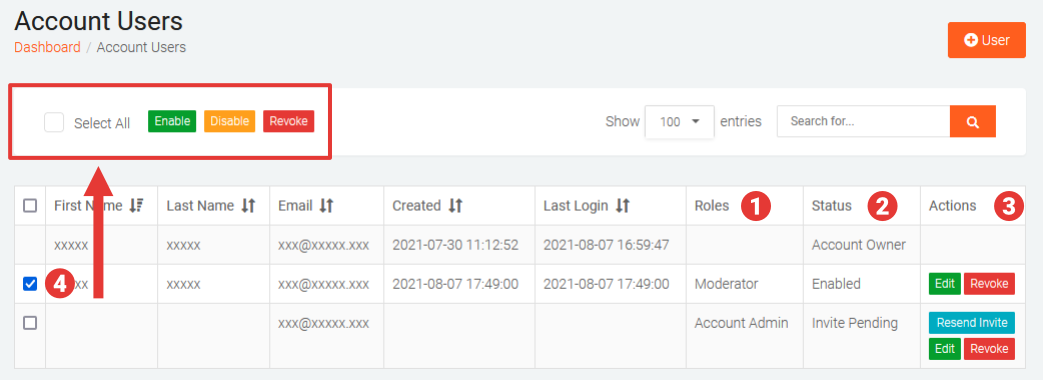
Locate and manage Account Users:
- Roles - this column indicates the current Role assign to each Account User.
- Status - this columns indicates the status of each Account User.
- Account Owner
- Enabled – user access to the Account is enabled
- Disabled – user access to the Account is disabled
- Invite Pending – user invite has been sent and awaiting acceptance
- Invite Declined – user has declined the invite
- Actions – this column allows you to perform specific actions for individual users.
- Edit – Edit the user’s permissions and enable/disable their access
- Revoke – Permanently remove user from this Account
- Resend Invite – resend an invite to a user
- Bulk Actions – you can select one or more users by selecting their associated checkboxes and clicking on one of the bulk actions buttons at the top.
- Enable – enables access for all selected users
- Disable -disables access for selected users
- Revoke – permanently removes the selected users form the Account