Viewing and exporting the Change Log
The Change Log in Buzzspark maintains an audit log of all activity with the Buzzspark Account. Access to the Change Log requires a Role of Account Admin or higher.
How to view the Change Log
Step 1:
From the left menu, browse to Settings > Change Log.
Step 2:
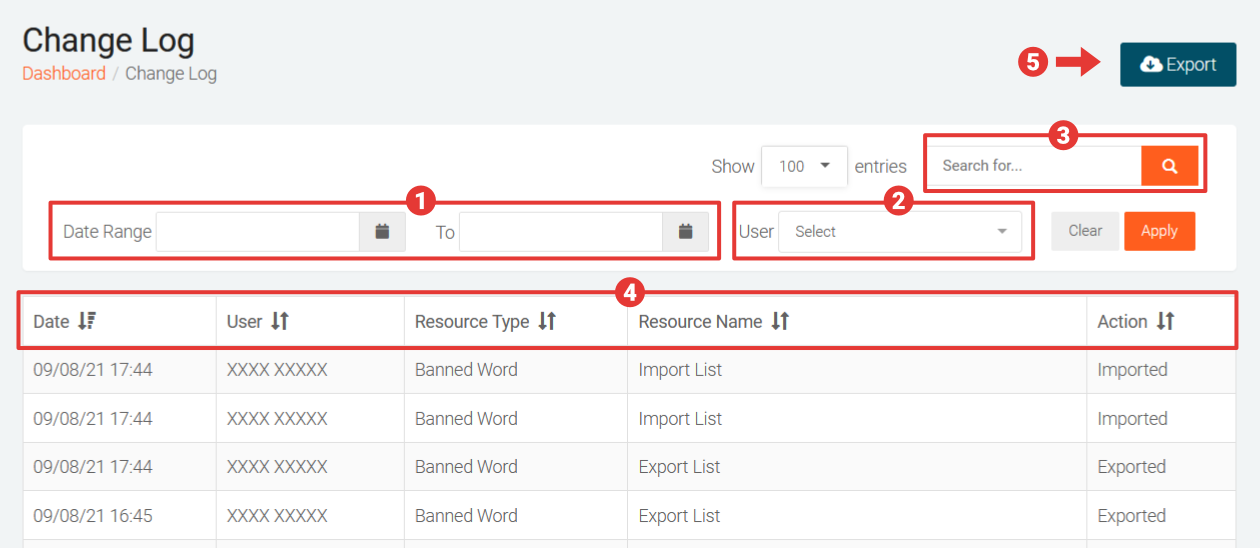
View and export the log using any of the filtering options below:
- Filter by Date
- Filter by User
- Search for specific activity
- Order the list by Date, User, Resource Type and Resource Name
- Export the full log as a CSV file