Cloning Widget Displays
Cloning Widget Displays
Buzzspark allows you to easily create a copy of an existing Widget Display to help you save time when you need to create a similar Display or test changes in an existing, live Display.
Step 1: Navigate to the Widget Displays
From the left menu, browse to Engage > Widget Display.
Step 2: Chose the Widget Display you wish to copy
On the Widget Displays Page:
- Locate the Widget Display you wish to copy.
- Click the corresponding Copy button under the Actions column.
Step 3: Name the new Display
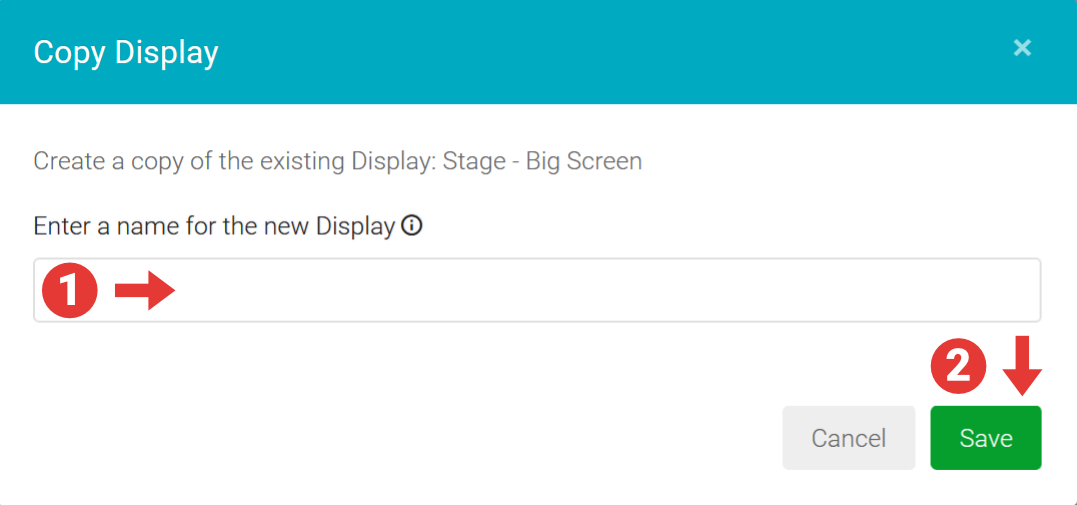
In the Copy Display modal:
- Enter a Name for your new Widget Display – this cannot be the same name as an existing Display.
- Click the Save button to save the new Widget Display.
The list of Displays will be updated, showing the newly created Widget Display which, you can now customise as needed.